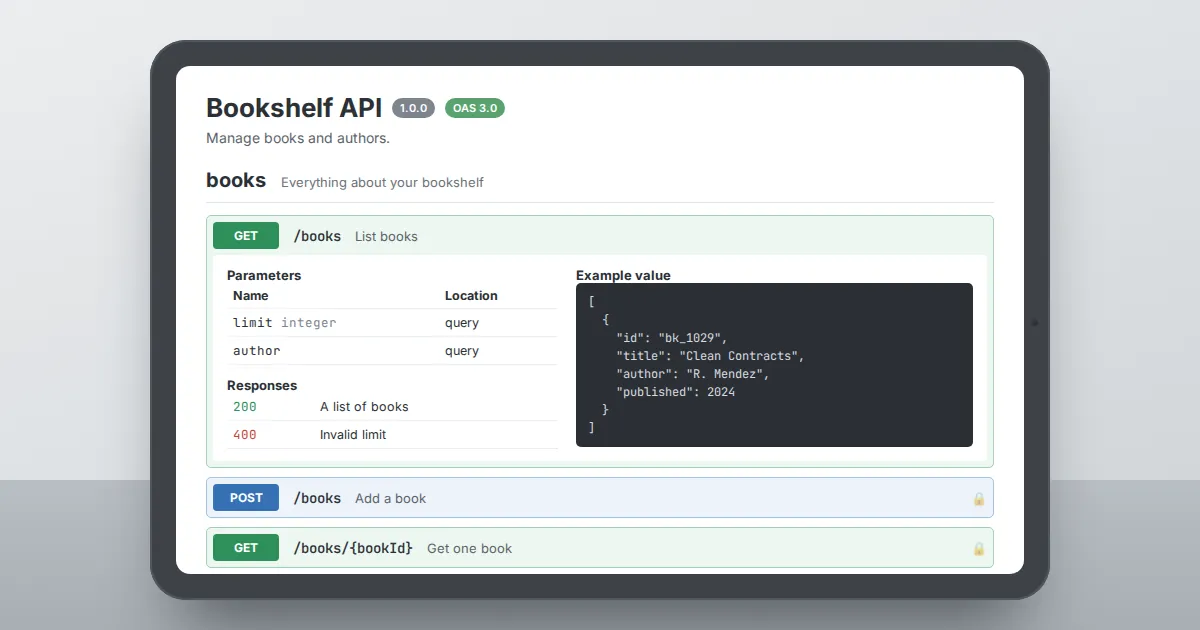
Swagger Editor is an open-source, browser-based editor for writing API descriptions in the OpenAPI format. You type YAML or JSON in one pane, and the other pane renders that description as interactive documentation.
Every keystroke is checked against the specification, so mistakes show up the moment you make them instead of weeks later in a code review.
The problem it solves
An API is a contract between the people who build a service and the people who call it. When that contract lives only in source code or in a wiki page, it drifts.
Field names change, a required parameter becomes optional, an error response disappears from the docs. OpenAPI fixes this by describing the API in a single machine-readable file.
Swagger Editor makes that file pleasant to write.
What you see on screen
The interface is split into two panes. The left pane is a code editor with syntax highlighting, auto-completion for OpenAPI keywords and inline error markers.
The right pane is a live preview built on Swagger UI: every path, method, parameter, request body and response appears as an expandable block, grouped by tag. If you add a server URL, the preview's Try it out button can even send real requests.
Who uses it
- API designers who sketch an interface before any code exists, so frontend and backend teams can work in parallel.
- Backend developers who need to document an existing service and want instant feedback on whether their description is valid.
- Technical writers who polish descriptions, summaries and examples that end up in public developer portals.
- QA engineers who read the contract to plan test cases and check edge cases such as error codes and enum values.
Design-first versus code-first
In a code-first workflow you write the service, then generate a description from annotations. In a design-first workflow you write the description first, agree on it, and then implement.
The editor works for both, but it shines in design-first work because changes cost nothing at that stage. Renaming a field in a YAML file takes seconds; renaming it after three clients depend on it takes a migration plan.
Which version should you use
The current major line, version 5, supports OpenAPI 2.0, 3.0.x and 3.1, and adds AsyncAPI support for event-driven APIs. It uses a modern editor component with better performance on large files.
Version 4 is still around and some teams keep it for older pipelines, but new projects should start on version 5.
Where to go next
If you want to run the tool offline, read the installation guide. If you are ready to write, start with the walkthrough on building your first OpenAPI description from an empty file.