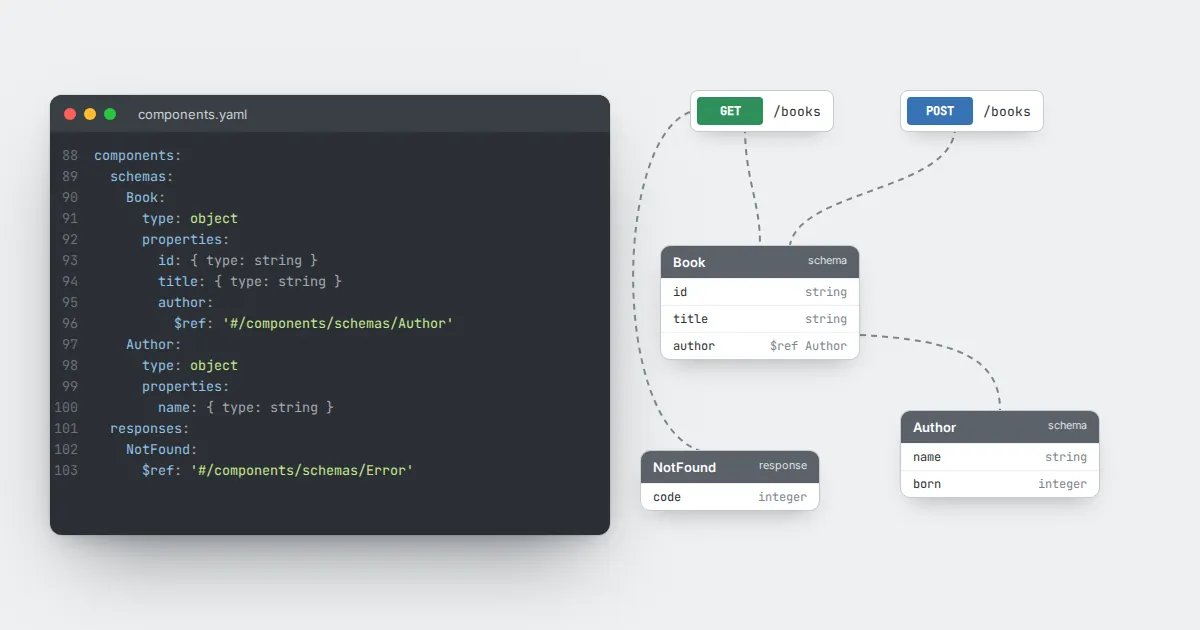
As an API grows, the same shapes appear again and again: a user object, a pagination parameter, an error response. Copying them is easy at first and painful later, because every change must be made in several places.
OpenAPI solves this with the components section and the $ref keyword, and Swagger Editor resolves those references live in the preview.
The components section
components:
  schemas:
    Book:
      type: object
      required: [id, title]
      properties:
        id: { type: string }
        title: { type: string }
  parameters:
    Limit:
      name: limit
      in: query
      schema: { type: integer, maximum: 100 }
  responses:
    NotFound:
      description: The resource was not found
Components are named and grouped by kind: schemas, parameters, responses, request bodies, headers, examples and security schemes.
Referencing a component
paths:
  /books:
    get:
      parameters:
        - $ref: '#/components/parameters/Limit'
      responses:
        '200':
          description: A list of books
          content:
            application/json:
              schema:
                type: array
                items:
                  $ref: '#/components/schemas/Book'
        '404':
          $ref: '#/components/responses/NotFound'
The value of $ref is a JSON pointer. The # means the current document, and each slash steps one level deeper. Quote it in YAML because of the leading hash.
Composing schemas
Use allOf to extend a base schema, for example a BookWithReviews that includes everything in Book plus a reviews array. Use oneOf when a value can take one of several distinct shapes, and add a discriminator so tools know which shape applies.
Splitting across files
References can point to other files, such as ./schemas/book.yaml. That keeps large descriptions manageable, but remember that a browser editor may not be able to read files from your disk.
A common approach is to edit split files in your code editor and bundle them into one document before opening it in the browser.
Naming tips
- Use singular nouns in PascalCase for schemas:
Book,Author. - Name error responses by meaning:
NotFound,Unauthorized. - Delete unused components; the editor warns about them for a reason.