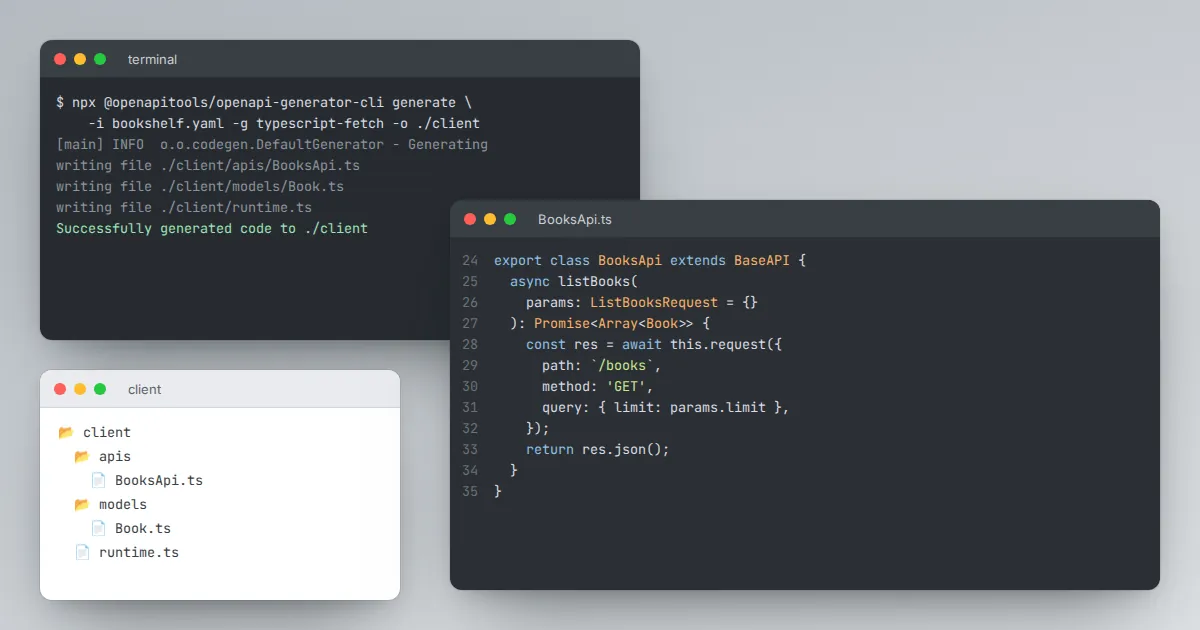
One of the biggest rewards of a clean OpenAPI description is code generation. From a single file you can produce client libraries for many languages and server skeletons that already have every route and model in place.
Swagger Editor is where you get the file into shape before generation.
Two families of generators
Swagger Codegen is the original project from the Swagger team. OpenAPI Generator is a community fork with a very large list of supported languages and frameworks.
Both read the same descriptions. Pick one, pin its version, and keep it the same across your team.
Generating from the editor
Depending on the version and configuration you run, the editor can offer Generate Server and Generate Client menus that send your description to a generator service and return a ZIP. This is fine for quick experiments.
For anything sensitive, run the generator locally instead, so your internal API description is not uploaded to a third-party service.
Generating from the command line
npx @openapitools/openapi-generator-cli generate \
  -i bookshelf.yaml \
  -g typescript-fetch \
  -o ./client
The -g option chooses the target. Most generators accept extra options for package names, date libraries and model naming; list them with the generator's config-help command.
Prepare the description first
- Give every operation an operationId. Generators turn these into method names. Without them you get names like
booksGet. - Name your schemas. Inline objects become awkward generated class names. Move them to components.
- Clear all warnings. Duplicate IDs and unresolved references that the editor tolerates can break generation.
- Use tags carefully. Many generators create one class per tag.
Keep generated code generated
Treat output as a build artifact. Do not hand-edit generated clients; regenerate them in CI when the description changes.
For servers, generate interfaces and implement them in separate files so regeneration never overwrites your logic.